🌊 React.JS: Deep Dive & Best Practices
Comprehensive guide to mastering React from foundational concepts to advanced techniques and best practices!
React: Deep Dive & Best Practices
Table of Contents
- Introduction to React
- Core Concepts
- Component Lifecycle
- Hooks Deep Dive
- State Management
- Performance Optimization
- Best Practices
- Lifecycle Terminology Tables
- References
Introduction to React
React is a JavaScript library for building user interfaces, developed and maintained by Meta (formerly Facebook). It enables developers to create reusable UI components that efficiently update and render when data changes.
Key Characteristics
- Declarative: Describe what the UI should look like based on current state, and React handles the updates
- Component-Based: Build encapsulated components that manage their own state and compose them into complex UIs
- Learn Once, Write Anywhere: Use React for web, mobile (React Native), desktop, and even VR applications
Why React?
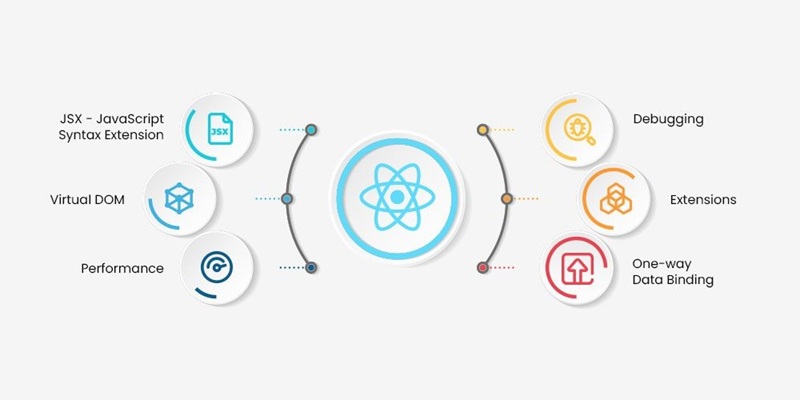
React revolutionized frontend development by introducing:
- Virtual DOM for efficient rendering
- Unidirectional data flow for predictable state management
- JSX syntax for intuitive component composition
- Rich ecosystem with extensive tooling and libraries
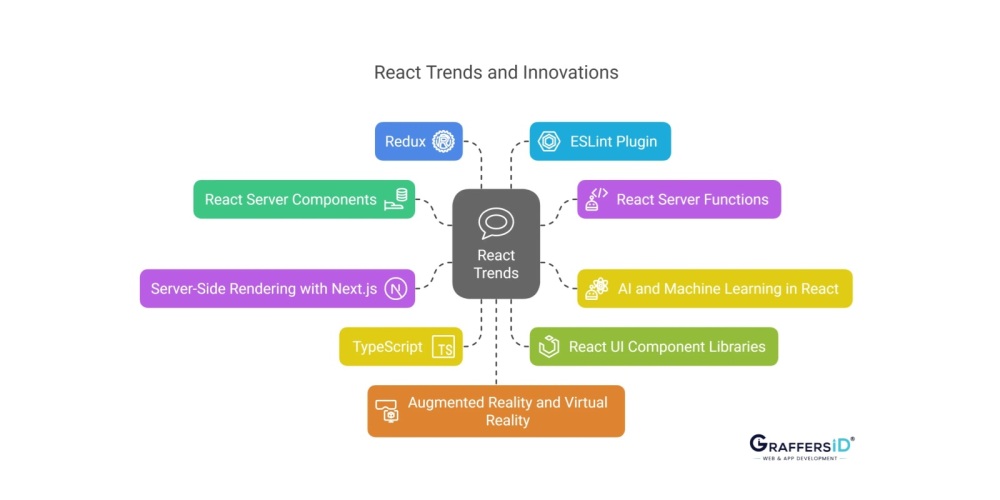 React Trends & Innovations!
Core Concepts
1. JSX (JavaScript XML)
JSX is a syntax extension that allows writing HTML-like code within JavaScript. It gets transpiled to regular JavaScript function calls.
1
2
3
4
5
6
7
8
9
// JSX syntax
const element = <h1 className="greeting">Hello, World!</h1>;

// Transpiles to
const element = React.createElement(
  'h1',
  { className: 'greeting' },
  'Hello, World!'
);
Key Rules:
- Use
classNameinstead ofclass - Use
htmlForinstead offor - All tags must be closed (self-closing for single tags:
<img />) - JavaScript expressions go inside curly braces
{} - Only one root element per component (use Fragments
<>...</>if needed)
2. Components
Components are the building blocks of React applications. They encapsulate UI logic and can be reused throughout the application.
Functional Components
Modern React primarily uses functional components:
1
2
3
4
5
6
7
8
function Welcome(props) {
  return <h1>Hello, {props.name}</h1>;
}

// Arrow function variant
const Welcome = (props) => {
  return <h1>Hello, {props.name}</h1>;
};
Class Components (Legacy)
While less common today, understanding class components is valuable for maintaining legacy code:
1
2
3
4
5
class Welcome extends React.Component {
  render() {
    return <h1>Hello, {this.props.name}</h1>;
  }
}
3. Props (Properties)
Props are read-only inputs passed from parent to child components, enabling data flow and component reusability.
1
2
3
4
5
6
7
8
9
10
11
12
13
14
15
16
17
18
19
20
21
22
23
24
25
function UserCard(props) {
  return (
    <div className="user-card">
      <h2>{props.name}</h2>
      <p>{props.email}</p>
      <p>Age: {props.age}</p>
    </div>
  );
}

// Usage with destructuring
function UserCard({ name, email, age }) {
  return (
    <div className="user-card">
      <h2>{name}</h2>
      <p>{email}</p>
      <p>Age: {age}</p>
    </div>
  );
}

// Parent component
function App() {
  return <UserCard name="John" email="john@example.com" age={30} />;
}
Props Characteristics:
- Immutable (read-only)
- Flow downward (parent to child)
- Can be any data type (strings, numbers, objects, functions, etc.)
- Can have default values using
defaultProps
4. State
State is mutable data managed within a component that can trigger re-renders when updated.
1
2
3
4
5
6
7
8
9
10
11
12
13
14
import { useState } from 'react';

function Counter() {
  const [count, setCount] = useState(0);

  return (
    <div>
      <p>Count: {count}</p>
      <button onClick={() => setCount(count + 1)}>Increment</button>
      <button onClick={() => setCount(count - 1)}>Decrement</button>
      <button onClick={() => setCount(0)}>Reset</button>
    </div>
  );
}
State Characteristics:
- Local to the component
- Asynchronous updates
- Triggers re-render when changed
- Should be treated as immutable
5. Virtual DOM
The Virtual DOM is a lightweight in-memory representation of the actual DOM. React uses it to optimize rendering performance.
How It Works:
- Initial Render: React creates a Virtual DOM tree
- State Change: When state updates, React creates a new Virtual DOM tree
- Diffing: React compares (diffs) the new tree with the previous one
- Reconciliation: React calculates the minimal set of changes needed
- Update: Only the necessary changes are applied to the real DOM
Benefits:
- Minimizes expensive DOM operations
- Batches multiple updates for efficiency
- Enables declarative programming model
6. Reconciliation Algorithm
Reconciliation is the process React uses to determine what changes need to be made to the DOM.
Key Principles:
- Element Type Comparison: If elements are of different types, React tears down the old tree and builds a new one
- Key Prop: Use unique
keyprops in lists to help React identify which items have changed - Component Updates: React only updates the changed components and their children
1
2
3
4
5
6
7
8
9
// Without keys (inefficient)
<ul>
  {items.map(item => <li>{item.name}</li>)}
</ul>

// With keys (efficient)
<ul>
  {items.map(item => <li key={item.id}>{item.name}</li>)}
</ul>
Component Lifecycle
Understanding the component lifecycle is crucial for managing side effects, data fetching, and cleanup operations.
Lifecycle Overview
Every React component goes through three main phases:
- Mounting: Component is being created and inserted into the DOM
- Updating: Component is being re-rendered due to changes in props or state
- Unmounting: Component is being removed from the DOM
Class Component Lifecycle Methods
1
2
3
4
5
6
7
8
9
10
11
12
13
14
15
16
17
18
19
20
21
22
23
24
25
26
27
28
29
30
31
32
33
34
35
36
37
38
39
40
41
42
43
44
45
46
47
48
49
50
51
52
53
54
55
56
57
58
59
60
61
62
class MyComponent extends React.Component {
  // MOUNTING PHASE
  constructor(props) {
    super(props);
    this.state = { data: null };
    // Initialize state, bind methods
  }

  static getDerivedStateFromProps(props, state) {
    // Sync state with props (rarely used)
    return null;
  }

  componentDidMount() {
    // After first render
    // Ideal for: API calls, subscriptions, DOM manipulation
    fetch('/api/data')
      .then(res => res.json())
      .then(data => this.setState({ data }));
  }

  // UPDATING PHASE
  shouldComponentUpdate(nextProps, nextState) {
    // Return false to prevent re-render (optimization)
    return true;
  }

  getSnapshotBeforeUpdate(prevProps, prevState) {
    // Capture DOM info before update (rarely used)
    return null;
  }

  componentDidUpdate(prevProps, prevState, snapshot) {
    // After re-render
    // Ideal for: DOM updates, network requests based on prop changes
    if (prevProps.userId !== this.props.userId) {
      this.fetchUserData(this.props.userId);
    }
  }

  // UNMOUNTING PHASE
  componentWillUnmount() {
    // Before component removal
    // Ideal for: Cleanup (timers, subscriptions, cancel requests)
    clearInterval(this.timer);
  }

  // ERROR HANDLING
  static getDerivedStateFromError(error) {
    // Update state to show fallback UI
    return { hasError: true };
  }

  componentDidCatch(error, info) {
    // Log error information
    console.error('Error caught:', error, info);
  }

  render() {
    return <div>{this.state.data}</div>;
  }
}
Functional Component Lifecycle with Hooks
Hooks provide lifecycle functionality in functional components:
1
2
3
4
5
6
7
8
9
10
11
12
13
14
15
16
17
18
19
20
21
22
23
24
25
26
27
28
29
30
31
32
33
34
35
36
37
38
39
40
41
42
43
44
45
46
47
48
49
50
51
52
53
54
55
56
57
58
59
60
61
62
63
64
65
66
67
import { useState, useEffect } from 'react';

function MyComponent({ userId }) {
  const [data, setData] = useState(null);

  // ComponentDidMount + ComponentDidUpdate
  useEffect(() => {
    const handler = setTimeout(() => {
      setDebouncedValue(value);
    }, delay);

    return () => {
      clearTimeout(handler);
    };
  }, [value, delay]);

  return debouncedValue;
}

// Usage: Search with debounce
function SearchComponent() {
  const [searchTerm, setSearchTerm] = useState('');
  const debouncedSearchTerm = useDebounce(searchTerm, 500);

  useEffect(() => {
    if (debouncedSearchTerm) {
      // API call only after user stops typing for 500ms
      fetch(`/api/search?q=${debouncedSearchTerm}`)
        .then(res => res.json())
        .then(data => console.log(data));
    }
  }, [debouncedSearchTerm]);

  return (
    <input
      value={searchTerm}
      onChange={(e) => setSearchTerm(e.target.value)}
      placeholder="Search..."
    />
  );
}

// Throttle: limit execution to once per interval
function useThrottle(callback, delay) {
  const lastRan = useRef(Date.now());

  return useCallback((...args) => {
    if (Date.now() - lastRan.current >= delay) {
      callback(...args);
      lastRan.current = Date.now();
    }
  }, [callback, delay]);
}

// Usage: Scroll event handler
function ScrollComponent() {
  const handleScroll = useThrottle(() => {
    console.log('Scroll position:', window.scrollY);
  }, 200);

  useEffect(() => {
    window.addEventListener('scroll', handleScroll);
    return () => window.removeEventListener('scroll', handleScroll);
  }, [handleScroll]);

  return <div style=>Scroll me</div>;
}
Hooks Deep Dive
Hooks are functions that let you use state and other React features in functional components.
Rules of Hooks
- Only call hooks at the top level - Don’t call inside loops, conditions, or nested functions
- Only call hooks from React functions - Call from functional components or custom hooks
useState
Manages local component state.
1
2
3
4
5
6
7
8
9
10
11
12
13
14
15
16
17
18
19
20
21
22
23
24
25
26
27
28
29
30
31
32
33
34
35
36
37
38
39
40
41
42
43
const [state, setState] = useState(initialValue);

// Multiple state variables
function Form() {
  const [name, setName] = useState('');
  const [email, setEmail] = useState('');
  const [age, setAge] = useState(0);

  return (
    <form>
      <input value={name} onChange={(e) => setName(e.target.value)} />
      <input value={email} onChange={(e) => setEmail(e.target.value)} />
      <input type="number" value={age} onChange={(e) => setAge(Number(e.target.value))} />
    </form>
  );
}

// Object state
function UserProfile() {
  const [user, setUser] = useState({ name: '', email: '', age: 0 });

  const updateName = (name) => {
    setUser(prevUser => ({ ...prevUser, name })); // Spread to preserve other properties
  };

  return <div>{user.name}</div>;
}

// Functional updates (when new state depends on previous state)
function Counter() {
  const [count, setCount] = useState(0);

  const increment = () => {
    setCount(prevCount => prevCount + 1); // Safer for async updates
  };

  return <button onClick={increment}>Count: {count}</button>;
}

// Lazy initialization (for expensive computations)
const [state, setState] = useState(() => {
  return expensiveCalculation();
});
useEffect
Handles side effects (data fetching, subscriptions, manual DOM manipulation).
1
2
3
4
5
6
7
8
9
10
11
12
13
14
15
16
17
18
19
20
21
22
23
24
25
26
27
28
29
30
31
32
33
34
35
36
37
38
39
40
41
42
43
44
45
46
47
48
49
50
51
52
53
54
55
56
57
58
59
60
61
62
63
64
65
66
67
68
69
70
71
useEffect(() => {
  // Effect code
  return () => {
    // Cleanup code (optional)
  };
}, [dependencies]);

// Data fetching
function UserProfile({ userId }) {
  const [user, setUser] = useState(null);
  const [loading, setLoading] = useState(true);
  const [error, setError] = useState(null);

  useEffect(() => {
    let cancelled = false; // Prevent setting state on unmounted component

    setLoading(true);
    fetch(`/api/users/${userId}`)
      .then(res => res.json())
      .then(data => {
        if (!cancelled) {
          setUser(data);
          setLoading(false);
        }
      })
      .catch(err => {
        if (!cancelled) {
          setError(err);
          setLoading(false);
        }
      });

    return () => {
      cancelled = true; // Cleanup
    };
  }, [userId]);

  if (loading) return <div>Loading...</div>;
  if (error) return <div>Error: {error.message}</div>;
  return <div>{user.name}</div>;
}

// Subscriptions with cleanup
function ChatRoom({ roomId }) {
  useEffect(() => {
    const subscription = chatAPI.subscribe(roomId, message => {
      console.log('New message:', message);
    });

    return () => {
      subscription.unsubscribe(); // Cleanup
    };
  }, [roomId]);

  return <div>Chat Room {roomId}</div>;
}

// Multiple effects for separation of concerns
function Profile() {
  useEffect(() => {
    // Effect 1: Fetch user data
    fetchUserData();
  }, []);

  useEffect(() => {
    // Effect 2: Track analytics
    trackPageView();
  }, []);

  return <div>Profile</div>;
}
useContext
Accesses context values without prop drilling.
1
2
3
4
5
6
7
8
9
10
11
12
13
14
15
16
17
18
19
20
21
22
23
24
25
26
27
28
29
30
31
32
33
34
35
36
37
38
39
40
41
42
import { createContext, useContext, useState } from 'react';

// Create context
const ThemeContext = createContext();

// Provider component
function ThemeProvider({ children }) {
  const [theme, setTheme] = useState('light');

  const toggleTheme = () => {
    setTheme(prevTheme => prevTheme === 'light' ? 'dark' : 'light');
  };

  return (
    <ThemeContext.Provider value=Jekyll::Drops::ThemeDrop>
      {children}
    </ThemeContext.Provider>
  );
}

// Consumer component
function ThemedButton() {
  const { theme, toggleTheme } = useContext(ThemeContext);

  return (
    <button
      style=
      onClick={toggleTheme}
    >
      Toggle Theme
    </button>
  );
}

// App structure
function App() {
  return (
    <ThemeProvider>
      <ThemedButton />
    </ThemeProvider>
  );
}
useReducer
Manages complex state logic with actions and reducers.
1
2
3
4
5
6
7
8
9
10
11
12
13
14
15
16
17
18
19
20
21
22
23
24
25
26
27
28
29
30
31
32
33
34
35
36
37
38
39
40
41
42
43
44
45
46
47
48
49
50
51
52
53
54
55
56
57
58
59
60
61
62
63
64
65
66
67
68
69
70
import { useReducer } from 'react';

// Reducer function
function reducer(state, action) {
  switch (action.type) {
    case 'INCREMENT':
      return { count: state.count + 1 };
    case 'DECREMENT':
      return { count: state.count - 1 };
    case 'RESET':
      return { count: 0 };
    default:
      throw new Error(`Unknown action: ${action.type}`);
  }
}

function Counter() {
  const [state, dispatch] = useReducer(reducer, { count: 0 });

  return (
    <div>
      <p>Count: {state.count}</p>
      <button onClick={() => dispatch({ type: 'INCREMENT' })}>+</button>
      <button onClick={() => dispatch({ type: 'DECREMENT' })}>-</button>
      <button onClick={() => dispatch({ type: 'RESET' })}>Reset</button>
    </div>
  );
}

// Complex example: Todo list
function todoReducer(state, action) {
  switch (action.type) {
    case 'ADD_TODO':
      return [...state, { id: Date.now(), text: action.payload, completed: false }];
    case 'TOGGLE_TODO':
      return state.map(todo =>
        todo.id === action.payload ? { ...todo, completed: !todo.completed } : todo
      );
    case 'DELETE_TODO':
      return state.filter(todo => todo.id !== action.payload);
    default:
      return state;
  }
}

function TodoList() {
  const [todos, dispatch] = useReducer(todoReducer, []);

  const addTodo = (text) => {
    dispatch({ type: 'ADD_TODO', payload: text });
  };

  return (
    <div>
      {todos.map(todo => (
        <div key={todo.id}>
          <span style=>
            {todo.text}
          </span>
          <button onClick={() => dispatch({ type: 'TOGGLE_TODO', payload: todo.id })}>
            Toggle
          </button>
          <button onClick={() => dispatch({ type: 'DELETE_TODO', payload: todo.id })}>
            Delete
          </button>
        </div>
      ))}
    </div>
  );
}
useRef
Creates a mutable reference that persists across renders without causing re-renders.
1
2
3
4
5
6
7
8
9
10
11
12
13
14
15
16
17
18
19
20
21
22
23
24
25
26
27
28
29
30
31
32
33
34
35
36
37
38
39
40
41
42
43
44
45
46
47
48
49
50
51
52
53
54
55
56
57
58
59
60
61
62
63
64
65
66
67
68
import { useRef, useEffect } from 'react';

// DOM manipulation
function TextInput() {
  const inputRef = useRef(null);

  const focusInput = () => {
    inputRef.current.focus();
  };

  useEffect(() => {
    inputRef.current.focus(); // Auto-focus on mount
  }, []);

  return (
    <div>
      <input ref={inputRef} type="text" />
      <button onClick={focusInput}>Focus Input</button>
    </div>
  );
}

// Storing previous values
function Counter() {
  const [count, setCount] = useState(0);
  const prevCountRef = useRef();

  useEffect(() => {
    prevCountRef.current = count;
  });

  const prevCount = prevCountRef.current;

  return (
    <div>
      <p>Current: {count}, Previous: {prevCount}</p>
      <button onClick={() => setCount(count + 1)}>Increment</button>
    </div>
  );
}

// Storing mutable values without re-rendering
function Timer() {
  const [count, setCount] = useState(0);
  const intervalRef = useRef();

  const startTimer = () => {
    intervalRef.current = setInterval(() => {
      setCount(c => c + 1);
    }, 1000);
  };

  const stopTimer = () => {
    clearInterval(intervalRef.current);
  };

  useEffect(() => {
    return () => clearInterval(intervalRef.current); // Cleanup
  }, []);

  return (
    <div>
      <p>Count: {count}</p>
      <button onClick={startTimer}>Start</button>
      <button onClick={stopTimer}>Stop</button>
    </div>
  );
}
useMemo
Memoizes expensive computations to avoid recalculating on every render.
1
2
3
4
5
6
7
8
9
10
11
12
13
14
15
16
17
18
19
20
21
22
23
24
25
26
27
28
29
30
31
32
import { useMemo, useState } from 'react';

function ExpensiveComponent({ items, filter }) {
  // Expensive calculation only runs when items or filter changes
  const filteredItems = useMemo(() => {
    console.log('Filtering items...');
    return items.filter(item => item.includes(filter));
  }, [items, filter]);

  return (
    <ul>
      {filteredItems.map((item, index) => (
        <li key={index}>{item}</li>
      ))}
    </ul>
  );
}

// Complex calculation example
function DataProcessor({ data, config }) {
  const processedData = useMemo(() => {
    return data
      .filter(item => item.value > config.threshold)
      .map(item => ({
        ...item,
        normalized: item.value / config.maxValue
      }))
      .sort((a, b) => b.normalized - a.normalized);
  }, [data, config]);

  return <div>{/* Render processedData */}</div>;
}
useCallback
Memoizes function references to prevent unnecessary re-renders of child components.
1
2
3
4
5
6
7
8
9
10
11
12
13
14
15
16
17
18
19
20
21
22
23
24
25
26
27
28
29
30
31
32
33
34
35
36
37
38
39
40
41
42
43
44
45
46
47
import { useCallback, memo } from 'react';

// Child component (memoized to prevent unnecessary re-renders)
const Button = memo(({ onClick, children }) => {
  console.log(`Rendering button: ${children}`);
  return <button onClick={onClick}>{children}</button>;
});

function ParentComponent() {
  const [count, setCount] = useState(0);
  const [otherState, setOtherState] = useState(0);

  // Without useCallback, this creates a new function on every render
  // const increment = () => setCount(c => c + 1);

  // With useCallback, function reference stays the same
  const increment = useCallback(() => {
    setCount(c => c + 1);
  }, []); // Empty deps = function never changes

  return (
    <div>
      <p>Count: {count}</p>
      <Button onClick={increment}>Increment</Button>
      <button onClick={() => setOtherState(s => s + 1)}>
        Other State: {otherState}
      </button>
    </div>
  );
}

// Example with dependencies
function SearchComponent({ onSearch }) {
  const [query, setQuery] = useState('');
  const [filters, setFilters] = useState({});

  const handleSearch = useCallback(() => {
    onSearch(query, filters);
  }, [query, filters, onSearch]); // Recreate when dependencies change

  return (
    <div>
      <input value={query} onChange={(e) => setQuery(e.target.value)} />
      <button onClick={handleSearch}>Search</button>
    </div>
  );
}
Custom Hooks
Reusable stateful logic extracted into functions.
1
2
3
4
5
6
7
8
9
10
11
12
13
14
15
16
17
18
19
20
21
22
23
24
25
26
27
28
29
30
31
32
33
34
35
36
37
38
39
40
41
42
43
44
45
46
47
48
49
50
51
52
53
54
55
56
57
58
59
60
61
62
63
64
65
66
67
68
69
70
71
72
73
74
75
76
77
78
79
80
81
82
83
84
85
86
87
88
89
90
91
92
93
94
95
96
97
98
99
100
101
102
103
104
105
106
// Custom hook for form handling
function useForm(initialValues) {
  const [values, setValues] = useState(initialValues);

  const handleChange = (e) => {
    setValues({
      ...values,
      [e.target.name]: e.target.value
    });
  };

  const resetForm = () => {
    setValues(initialValues);
  };

  return { values, handleChange, resetForm };
}

// Usage
function LoginForm() {
  const { values, handleChange, resetForm } = useForm({
    username: '',
    password: ''
  });

  const handleSubmit = (e) => {
    e.preventDefault();
    console.log(values);
    resetForm();
  };

  return (
    <form onSubmit={handleSubmit}>
      <input name="username" value={values.username} onChange={handleChange} />
      <input name="password" type="password" value={values.password} onChange={handleChange} />
      <button type="submit">Login</button>
    </form>
  );
}

// Custom hook for data fetching
function useFetch(url) {
  const [data, setData] = useState(null);
  const [loading, setLoading] = useState(true);
  const [error, setError] = useState(null);

  useEffect(() => {
    let cancelled = false;

    fetch(url)
      .then(res => res.json())
      .then(data => {
        if (!cancelled) {
          setData(data);
          setLoading(false);
        }
      })
      .catch(err => {
        if (!cancelled) {
          setError(err);
          setLoading(false);
        }
      });

    return () => {
      cancelled = true;
    };
  }, [url]);

  return { data, loading, error };
}

// Usage
function UserProfile({ userId }) {
  const { data: user, loading, error } = useFetch(`/api/users/${userId}`);

  if (loading) return <div>Loading...</div>;
  if (error) return <div>Error: {error.message}</div>;
  return <div>{user.name}</div>;
}

// Custom hook for local storage
function useLocalStorage(key, initialValue) {
  const [value, setValue] = useState(() => {
    const stored = localStorage.getItem(key);
    return stored ? JSON.parse(stored) : initialValue;
  });

  useEffect(() => {
    localStorage.setItem(key, JSON.stringify(value));
  }, [key, value]);

  return [value, setValue];
}

// Usage
function Settings() {
  const [theme, setTheme] = useLocalStorage('theme', 'light');

  return (
    <div>
      <button onClick={() => setTheme('dark')}>Dark</button>
      <button onClick={() => setTheme('light')}>Light</button>
    </div>
  );
}
State Management
Local State vs Global State
Local State: Managed within a component using useState or useReducer
- Use for: UI state, form inputs, toggles specific to one component
Global State: Shared across multiple components
- Use for: User authentication, theme, language preferences, shopping cart
Context API for Global State
1
2
3
4
5
6
7
8
9
10
11
12
13
14
15
16
17
18
19
20
21
22
23
24
25
26
27
28
29
30
31
32
33
34
35
36
37
38
39
40
41
42
43
44
45
46
47
48
49
50
51
52
53
54
55
56
57
58
59
60
61
62
63
64
65
66
67
68
69
70
71
import { createContext, useContext, useReducer } from 'react';

// Define initial state and reducer
const initialState = {
  user: null,
  theme: 'light',
  notifications: []
};

function appReducer(state, action) {
  switch (action.type) {
    case 'SET_USER':
      return { ...state, user: action.payload };
    case 'SET_THEME':
      return { ...state, theme: action.payload };
    case 'ADD_NOTIFICATION':
      return {
        ...state,
        notifications: [...state.notifications, action.payload]
      };
    case 'REMOVE_NOTIFICATION':
      return {
        ...state,
        notifications: state.notifications.filter(n => n.id !== action.payload)
      };
    default:
      return state;
  }
}

// Create context
const AppContext = createContext();

// Provider component
export function AppProvider({ children }) {
  const [state, dispatch] = useReducer(appReducer, initialState);

  const value = {
    state,
    setUser: (user) => dispatch({ type: 'SET_USER', payload: user }),
    setTheme: (theme) => dispatch({ type: 'SET_THEME', payload: theme }),
    addNotification: (notification) => dispatch({ type: 'ADD_NOTIFICATION', payload: notification }),
    removeNotification: (id) => dispatch({ type: 'REMOVE_NOTIFICATION', payload: id })
  };

  return <AppContext.Provider value={value}>{children}</AppContext.Provider>;
}

// Custom hook for easy access
export function useApp() {
  const context = useContext(AppContext);
  if (!context) {
    throw new Error('useApp must be used within AppProvider');
  }
  return context;
}

// Usage in components
function UserProfile() {
  const { state, setUser } = useApp();

  return (
    <div>
      {state.user ? (
        <p>Welcome, {state.user.name}</p>
      ) : (
        <button onClick={() => setUser({ name: 'John' })}>Login</button>
      )}
    </div>
  );
}
Prop Drilling Problem and Solutions
Prop Drilling: Passing props through multiple levels of components that don’t need them.
1
2
3
4
5
6
7
8
9
10
11
12
13
14
15
16
17
18
19
20
21
22
23
24
25
26
27
28
29
30
31
32
33
34
35
36
37
38
39
40
41
42
43
44
45
46
47
48
49
50
51
52
53
54
// Problem: Prop drilling
function App() {
  const [user, setUser] = useState(null);
  return <Parent user={user} setUser={setUser} />;
}

function Parent({ user, setUser }) {
  return <Child user={user} setUser={setUser} />; // Parent doesn't use these
}

function Child({ user, setUser }) {
  return <GrandChild user={user} setUser={setUser} />; // Child doesn't use these
}

function GrandChild({ user, setUser }) {
  return <div>{user?.name}</div>; // Only GrandChild uses them
}

// Solution 1: Context API
const UserContext = createContext();

function App() {
  const [user, setUser] = useState(null);
  return (
    <UserContext.Provider value=>
      <Parent />
    </UserContext.Provider>
  );
}

function Parent() {
  return <Child />; // No props needed
}

function Child() {
  return <GrandChild />; // No props needed
}

function GrandChild() {
  const { user } = useContext(UserContext);
  return <div>{user?.name}</div>;
}

// Solution 2: Component Composition
function App() {
  const [user, setUser] = useState(null);
  return (
    <Parent>
      <Child>
        <GrandChild user={user} />
      </Child>
    </Parent>
  );
}
Performance Optimization
1. React.memo
Prevents unnecessary re-renders of functional components by memoizing the result.
1
2
3
4
5
6
7
8
9
10
11
12
13
14
15
16
17
18
19
20
21
22
23
24
import { memo } from 'react';

// Without memo: re-renders on every parent render
function ExpensiveComponent({ data }) {
  console.log('Rendering...');
  return <div>{data}</div>;
}

// With memo: only re-renders when props change
const MemoizedComponent = memo(function ExpensiveComponent({ data }) {
  console.log('Rendering...');
  return <div>{data}</div>;
});

// Custom comparison function
const MemoizedComponent = memo(
  function ExpensiveComponent({ data }) {
    return <div>{data.value}</div>;
  },
  (prevProps, nextProps) => {
    // Return true if props are equal (skip re-render)
    return prevProps.data.value === nextProps.data.value;
  }
);
2. Code Splitting and Lazy Loading
Load components only when needed to reduce initial bundle size.
1
2
3
4
5
6
7
8
9
10
11
12
13
14
15
16
17
18
19
20
21
22
23
24
25
26
27
28
29
30
31
32
33
34
35
36
37
38
39
40
41
42
43
import { lazy, Suspense } from 'react';

// Lazy load component
const Dashboard = lazy(() => import('./Dashboard'));
const Profile = lazy(() => import('./Profile'));
const Settings = lazy(() => import('./Settings'));

function App() {
  const [currentPage, setCurrentPage] = useState('dashboard');

  return (
    <div>
      <nav>
        <button onClick={() => setCurrentPage('dashboard')}>Dashboard</button>
        <button onClick={() => setCurrentPage('profile')}>Profile</button>
        <button onClick={() => setCurrentPage('settings')}>Settings</button>
      </nav>

      <Suspense fallback={<div>Loading...</div>}>
        {currentPage === 'dashboard' && <Dashboard />}
        {currentPage === 'profile' && <Profile />}
        {currentPage === 'settings' && <Settings />}
      </Suspense>
    </div>
  );
}

// Route-based code splitting
import { BrowserRouter, Routes, Route } from 'react-router-dom';

function App() {
  return (
    <BrowserRouter>
      <Suspense fallback={<div>Loading page...</div>}>
        <Routes>
          <Route path="/" element={<Dashboard />} />
          <Route path="/profile" element={<Profile />} />
          <Route path="/settings" element={<Settings />} />
        </Routes>
      </Suspense>
    </BrowserRouter>
  );
}
3. Virtualization for Large Lists
Render only visible items in large lists.
1
2
3
4
5
6
7
8
9
10
11
12
13
14
15
16
17
18
19
20
21
// Using react-window library
import { FixedSizeList } from 'react-window';

function LargeList({ items }) {
  const Row = ({ index, style }) => (
    <div style={style}>
      Item {items[index].name}
    </div>
  );

  return (
    <FixedSizeList
      height={600}
      itemCount={items.length}
      itemSize={50}
      width="100%"
    >
      {Row}
    </FixedSizeList>
  );
}
4. Debouncing and Throttling
Control frequency of expensive operations.
1
2
3
4
5
6
7
8
9
10
11
12
13
14
15
16
17
18
19
20
21
22
23
24
25
26
27
28
29
30
31
32
33
34
35
import { useState, useEffect, useCallback } from 'react';

// Debounce: wait until user stops typing
function useDebounce(value, delay) {
  const [debouncedValue, setDebouncedValue] = useState(value);

  useEffect(() => {
      fetch(`/api/users/${userId}`)
        .then(res => res.json())
        .then(data => setData(data));
    }, [userId]); // Dependency array

    // ComponentDidMount only (empty dependency array)
    useEffect(() => {
      console.log('Component mounted');
    }, []);

    // ComponentDidUpdate only (runs after every render except first)
    useEffect(() => {
      console.log('Component updated');
    });

    // ComponentWillUnmount (cleanup function)
    useEffect(() => {
      const timer = setInterval(() => {
        console.log('Tick');
      }, 1000);

      return () => {
        clearInterval(timer); // Cleanup
      };
    }, []);

    return <div>{data?.name}</div>;
  }
5. Avoiding Inline Functions and Objects
1
2
3
4
5
6
7
8
9
10
11
12
13
14
15
16
17
18
19
20
21
22
23
24
25
26
27
28
29
30
31
32
33
34
35
// Bad: Creates new function on every render
function Parent() {
  return <Child onClick={() => console.log('clicked')} />;
}

// Good: Stable function reference
function Parent() {
  const handleClick = useCallback(() => {
    console.log('clicked');
  }, []);

  return <Child onClick={handleClick} />;
}

// Bad: Creates new object on every render
function Parent() {
  return <Child style= />;
}

// Good: Stable object reference
const buttonStyle = { color: 'red' };

function Parent() {
  return <Child style={buttonStyle} />;
}

// Or use useMemo for dynamic styles
function Parent({ isActive }) {
  const buttonStyle = useMemo(() => ({
    color: isActive ? 'red' : 'blue',
    fontWeight: isActive ? 'bold' : 'normal'
  }), [isActive]);

  return <Child style={buttonStyle} />;
}
6. Key Prop Optimization
1
2
3
4
5
6
7
8
9
10
11
12
13
14
15
// Bad: Using index as key (can cause issues with reordering)
{items.map((item, index) => (
  <Item key={index} data={item} />
))}

// Good: Using unique identifier
{items.map(item => (
  <Item key={item.id} data={item} />
))}

// For static lists where order never changes, index is acceptable
const STATIC_MENU = ['Home', 'About', 'Contact'];
{STATIC_MENU.map((item, index) => (
  <MenuItem key={index}>{item}</MenuItem>
))}
Best Practices
1. Component Design
1
2
3
4
5
6
7
8
9
10
11
12
13
14
15
16
17
18
19
20
21
22
23
24
25
26
27
28
29
30
31
32
33
34
35
36
37
38
39
40
41
42
43
44
// Single Responsibility Principle
// Bad: Component does too much
function UserDashboard() {
  const [user, setUser] = useState(null);
  const [posts, setPosts] = useState([]);
  const [comments, setComments] = useState([]);

  // Lots of logic...

  return (
    <div>
      {/* Lots of JSX */}
    </div>
  );
}

// Good: Split into smaller components
function UserDashboard() {
  return (
    <div>
      <UserProfile />
      <UserPosts />
      <UserComments />
    </div>
  );
}

function UserProfile() {
  const [user, setUser] = useState(null);
  // Profile-specific logic
  return <div>{/* Profile JSX */}</div>;
}

function UserPosts() {
  const [posts, setPosts] = useState([]);
  // Posts-specific logic
  return <div>{/* Posts JSX */}</div>;
}

function UserComments() {
  const [comments, setComments] = useState([]);
  // Comments-specific logic
  return <div>{/* Comments JSX */}</div>;
}
2. State Management
1
2
3
4
5
6
7
8
9
10
11
12
13
14
15
16
17
18
19
20
21
22
23
24
25
26
27
28
29
30
31
32
33
34
35
36
37
38
39
40
41
42
43
44
45
46
47
48
49
50
51
// Keep state as close to where it's used as possible
// Bad: Lifting state unnecessarily high
function App() {
  const [modalOpen, setModalOpen] = useState(false);

  return (
    <div>
      <Header />
      <Content />
      <Footer modalOpen={modalOpen} setModalOpen={setModalOpen} />
    </div>
  );
}

// Good: State lives where it's needed
function Footer() {
  const [modalOpen, setModalOpen] = useState(false);

  return (
    <footer>
      <button onClick={() => setModalOpen(true)}>Open Modal</button>
      {modalOpen && <Modal onClose={() => setModalOpen(false)} />}
    </footer>
  );
}

// Derive state when possible instead of storing it
// Bad: Storing derived state
function ProductList({ products }) {
  const [filteredProducts, setFilteredProducts] = useState([]);
  const [filter, setFilter] = useState('all');

  useEffect(() => {
    setFilteredProducts(
      products.filter(p => filter === 'all' || p.category === filter)
    );
  }, [products, filter]);

  return <div>{/* Render filteredProducts */}</div>;
}

// Good: Calculate derived state
function ProductList({ products }) {
  const [filter, setFilter] = useState('all');

  const filteredProducts = products.filter(
    p => filter === 'all' || p.category === filter
  );

  return <div>{/* Render filteredProducts */}</div>;
}
3. Props and PropTypes
1
2
3
4
5
6
7
8
9
10
11
12
13
14
15
16
17
18
19
20
21
22
23
24
25
26
27
28
29
30
31
32
33
34
35
36
37
38
39
40
41
42
43
44
45
46
47
48
import PropTypes from 'prop-types';

// Define prop types for documentation and validation
function UserCard({ name, email, age, onEdit, isActive }) {
  return (
    <div>
      <h2>{name}</h2>
      <p>{email}</p>
      <p>Age: {age}</p>
      {isActive && <span>Active</span>}
      <button onClick={onEdit}>Edit</button>
    </div>
  );
}

UserCard.propTypes = {
  name: PropTypes.string.isRequired,
  email: PropTypes.string.isRequired,
  age: PropTypes.number,
  onEdit: PropTypes.func.isRequired,
  isActive: PropTypes.bool
};

UserCard.defaultProps = {
  age: 0,
  isActive: false
};

// Or use TypeScript for type safety
interface UserCardProps {
  name: string;
  email: string;
  age?: number;
  onEdit: () => void;
  isActive?: boolean;
}

function UserCard({ name, email, age = 0, onEdit, isActive = false }: UserCardProps) {
  return (
    <div>
      <h2>{name}</h2>
      <p>{email}</p>
      <p>Age: {age}</p>
      {isActive && <span>Active</span>}
      <button onClick={onEdit}>Edit</button>
    </div>
  );
}
4. Error Handling
1
2
3
4
5
6
7
8
9
10
11
12
13
14
15
16
17
18
19
20
21
22
23
24
25
26
27
28
29
30
31
32
33
34
35
36
37
38
39
40
41
42
43
44
45
46
47
48
49
50
51
52
53
54
55
56
57
58
59
60
61
62
63
64
65
66
67
68
69
70
71
72
73
74
75
76
77
78
79
import { Component } from 'react';

// Error Boundary Component
class ErrorBoundary extends Component {
  constructor(props) {
    super(props);
    this.state = { hasError: false, error: null, errorInfo: null };
  }

  static getDerivedStateFromError(error) {
    return { hasError: true };
  }

  componentDidCatch(error, errorInfo) {
    console.error('Error caught by boundary:', error, errorInfo);
    this.setState({ error, errorInfo });
    // Log to error reporting service
    // logErrorToService(error, errorInfo);
  }

  render() {
    if (this.state.hasError) {
      return (
        <div>
          <h1>Something went wrong.</h1>
          <details style=>
            {this.state.error && this.state.error.toString()}
            <br />
            {this.state.errorInfo.componentStack}
          </details>
        </div>
      );
    }

    return this.props.children;
  }
}

// Usage
function App() {
  return (
    <ErrorBoundary>
      <MyComponent />
    </ErrorBoundary>
  );
}

// Handling errors in async operations
function DataFetcher() {
  const [data, setData] = useState(null);
  const [error, setError] = useState(null);
  const [loading, setLoading] = useState(false);

  const fetchData = async () => {
    try {
      setLoading(true);
      setError(null);
      const response = await fetch('/api/data');

      if (!response.ok) {
        throw new Error(`HTTP error! status: ${response.status}`);
      }

      const result = await response.json();
      setData(result);
    } catch (err) {
      setError(err.message);
      console.error('Fetch error:', err);
    } finally {
      setLoading(false);
    }
  };

  if (loading) return <div>Loading...</div>;
  if (error) return <div>Error: {error}</div>;
  if (!data) return <button onClick={fetchData}>Load Data</button>;

  return <div>{JSON.stringify(data)}</div>;
}
5. Controlled vs Uncontrolled Components
1
2
3
4
5
6
7
8
9
10
11
12
13
14
15
16
17
18
19
20
21
22
23
24
25
26
27
28
29
30
31
32
33
34
35
36
37
38
39
40
41
42
43
44
45
46
47
48
49
50
51
52
53
54
55
56
57
58
59
60
61
62
63
64
65
66
67
68
69
70
71
72
73
74
// Controlled Component: React controls the form state
function ControlledForm() {
  const [formData, setFormData] = useState({
    username: '',
    email: '',
    password: ''
  });

  const handleChange = (e) => {
    setFormData({
      ...formData,
      [e.target.name]: e.target.value
    });
  };

  const handleSubmit = (e) => {
    e.preventDefault();
    console.log('Form data:', formData);
  };

  return (
    <form onSubmit={handleSubmit}>
      <input
        name="username"
        value={formData.username}
        onChange={handleChange}
        placeholder="Username"
      />
      <input
        name="email"
        value={formData.email}
        onChange={handleChange}
        placeholder="Email"
      />
      <input
        name="password"
        type="password"
        value={formData.password}
        onChange={handleChange}
        placeholder="Password"
      />
      <button type="submit">Submit</button>
    </form>
  );
}

// Uncontrolled Component: DOM controls the form state
function UncontrolledForm() {
  const usernameRef = useRef();
  const emailRef = useRef();
  const passwordRef = useRef();

  const handleSubmit = (e) => {
    e.preventDefault();
    console.log('Form data:', {
      username: usernameRef.current.value,
      email: emailRef.current.value,
      password: passwordRef.current.value
    });
  };

  return (
    <form onSubmit={handleSubmit}>
      <input ref={usernameRef} name="username" placeholder="Username" />
      <input ref={emailRef} name="email" placeholder="Email" />
      <input ref={passwordRef} name="password" type="password" placeholder="Password" />
      <button type="submit">Submit</button>
    </form>
  );
}

// When to use which:
// Controlled: When you need validation, conditional rendering, or dynamic forms
// Uncontrolled: For simple forms or when integrating with non-React code
6. Conditional Rendering Patterns
1
2
3
4
5
6
7
8
9
10
11
12
13
14
15
16
17
18
19
20
21
22
23
24
25
26
27
28
29
30
31
32
33
34
35
36
37
38
39
40
41
42
43
44
45
46
47
48
49
50
51
52
53
54
55
56
57
58
59
60
61
62
// 1. If-else with early return
function Greeting({ user }) {
  if (!user) {
    return <div>Please log in</div>;
  }

  return <div>Welcome, {user.name}</div>;
}

// 2. Ternary operator
function Status({ isOnline }) {
  return (
    <div>
      User is {isOnline ? 'online' : 'offline'}
    </div>
  );
}

// 3. Logical AND (&&)
function Notifications({ count }) {
  return (
    <div>
      {count > 0 && <span>You have {count} notifications</span>}
    </div>
  );
}

// 4. Switch statement for multiple conditions
function UserRole({ role }) {
  switch (role) {
    case 'admin':
      return <AdminDashboard />;
    case 'moderator':
      return <ModeratorDashboard />;
    case 'user':
      return <UserDashboard />;
    default:
      return <GuestView />;
  }
}

// 5. Object mapping for cleaner switch alternatives
function UserRole({ role }) {
  const roleComponents = {
    admin: <AdminDashboard />,
    moderator: <ModeratorDashboard />,
    user: <UserDashboard />,
    guest: <GuestView />
  };

  return roleComponents[role] || <GuestView />;
}

// 6. Null coalescing for default values
function Avatar({ user }) {
  return (
    <img
      src={user?.avatar ?? '/default-avatar.png'}
      alt={user?.name ?? 'Anonymous'}
    />
  );
}
7. Event Handling Best Practices
1
2
3
4
5
6
7
8
9
10
11
12
13
14
15
16
17
18
19
20
21
22
23
24
25
26
27
28
29
30
31
32
33
34
35
36
37
38
39
40
41
42
43
44
45
46
47
48
49
50
51
52
53
54
55
56
57
58
59
60
61
62
63
64
65
66
67
68
69
70
71
// 1. Prevent default behavior
function Form() {
  const handleSubmit = (e) => {
    e.preventDefault(); // Prevent page reload
    console.log('Form submitted');
  };

  return (
    <form onSubmit={handleSubmit}>
      <button type="submit">Submit</button>
    </form>
  );
}

// 2. Stop event propagation
function NestedButtons() {
  const handleParentClick = () => console.log('Parent clicked');
  const handleChildClick = (e) => {
    e.stopPropagation(); // Prevent parent handler from firing
    console.log('Child clicked');
  };

  return (
    <div onClick={handleParentClick}>
      <button onClick={handleChildClick}>Click me</button>
    </div>
  );
}

// 3. Passing arguments to event handlers
function ItemList({ items, onDelete }) {
  return (
    <ul>
      {items.map(item => (
        <li key={item.id}>
          {item.name}
          <button onClick={() => onDelete(item.id)}>Delete</button>
          {/* Or use bind */}
          <button onClick={onDelete.bind(null, item.id)}>Delete</button>
        </li>
      ))}
    </ul>
  );
}

// 4. Synthetic events (React's cross-browser wrapper)
function InputHandler() {
  const handleChange = (e) => {
    // e is a SyntheticEvent
    console.log(e.target.value); // Safe to use

    // If you need the native event:
    console.log(e.nativeEvent);
  };

  return <input onChange={handleChange} />;
}

// 5. Event pooling (older React versions)
function OlderReactPattern() {
  const handleClick = (e) => {
    // In React 16 and below, need to persist for async access
    e.persist();

    setTimeout(() => {
      console.log(e.target.value); // Now safe
    }, 1000);
  };

  return <button onClick={handleClick}>Click</button>;
}
8. Folder Structure
1
2
3
4
5
6
7
8
9
10
11
12
13
14
15
16
17
18
19
20
21
22
23
24
25
26
27
28
29
30
31
32
33
34
35
36
37
38
39
40
41
42
43
44
45
46
src/
├── components/           # Reusable components
│   ├── common/          # Shared components (Button, Input, Modal)
│   │   ├── Button.jsx
│   │   ├── Input.jsx
│   │   └── Modal.jsx
│   ├── layout/          # Layout components (Header, Footer, Sidebar)
│   │   ├── Header.jsx
│   │   ├── Footer.jsx
│   │   └── Sidebar.jsx
│   └── features/        # Feature-specific components
│       ├── UserProfile/
│       │   ├── UserProfile.jsx
│       │   ├── UserProfile.module.css
│       │   └── index.js
│       └── ProductList/
│           ├── ProductList.jsx
│           ├── ProductItem.jsx
│           └── index.js
├── hooks/               # Custom hooks
│   ├── useAuth.js
│   ├── useFetch.js
│   └── useLocalStorage.js
├── context/             # Context providers
│   ├── AuthContext.jsx
│   ├── ThemeContext.jsx
│   └── index.js
├── pages/               # Page components (for routing)
│   ├── Home.jsx
│   ├── About.jsx
│   ├── Dashboard.jsx
│   └── NotFound.jsx
├── services/            # API calls and external services
│   ├── api.js
│   ├── auth.js
│   └── storage.js
├── utils/               # Utility functions
│   ├── formatDate.js
│   ├── validation.js
│   └── constants.js
├── styles/              # Global styles
│   ├── globals.css
│   ├── variables.css
│   └── reset.css
├── App.jsx              # Main App component
└── main.jsx             # Entry point
9. Naming Conventions
1
2
3
4
5
6
7
8
9
10
11
12
13
14
15
16
17
18
19
20
21
22
23
24
25
26
27
28
29
30
31
32
33
34
// Components: PascalCase
function UserProfile() {}
const ProductCard = () => {};

// Files: Match component name
// UserProfile.jsx
// ProductCard.tsx

// Props: camelCase
<UserCard userName="John" isActive={true} onUpdate={handleUpdate} />

// Event handlers: handle + EventName
const handleClick = () => {};
const handleSubmit = () => {};
const handleChange = () => {};

// Boolean props/state: is/has/should prefix
const [isLoading, setIsLoading] = useState(false);
const [hasError, setHasError] = useState(false);
const [shouldRender, setShouldRender] = useState(true);

// Custom hooks: use + Functionality
function useAuth() {}
function useFetch(url) {}
function useLocalStorage(key) {}

// Constants: UPPER_SNAKE_CASE
const API_BASE_URL = 'https://api.example.com';
const MAX_RETRIES = 3;

// Functions: camelCase, descriptive verbs
function fetchUserData() {}
function calculateTotal() {}
function validateEmail() {}
10. Testing Best Practices
1
2
3
4
5
6
7
8
9
10
11
12
13
14
15
16
17
18
19
20
21
22
23
24
25
26
27
28
29
30
31
32
33
34
35
36
37
38
39
40
41
42
43
44
45
46
47
48
49
50
51
52
// Using React Testing Library
import { render, screen, fireEvent, waitFor } from '@testing-library/react';
import userEvent from '@testing-library/user-event';
import Counter from './Counter';

describe('Counter Component', () => {
  test('renders initial count', () => {
    render(<Counter />);
    expect(screen.getByText('Count: 0')).toBeInTheDocument();
  });

  test('increments count when button clicked', () => {
    render(<Counter />);
    const button = screen.getByRole('button', { name: /increment/i });
    fireEvent.click(button);
    expect(screen.getByText('Count: 1')).toBeInTheDocument();
  });

  test('decrements count when button clicked', async () => {
    render(<Counter initialCount={5} />);
    const button = screen.getByRole('button', { name: /decrement/i });
    await userEvent.click(button);
    expect(screen.getByText('Count: 4')).toBeInTheDocument();
  });
});

// Testing async operations
test('loads and displays data', async () => {
  render(<DataFetcher url="/api/data" />);

  // Initially shows loading
  expect(screen.getByText('Loading...')).toBeInTheDocument();

  // Wait for data to load
  await waitFor(() => {
    expect(screen.getByText('Data loaded')).toBeInTheDocument();
  });
});

// Testing with Context
import { ThemeProvider } from './ThemeContext';

test('applies theme from context', () => {
  render(
    <ThemeProvider>
      <ThemedButton />
    </ThemeProvider>
  );

  const button = screen.getByRole('button');
  expect(button).toHaveStyle({ background: '#fff' });
});
Lifecycle Terminology Tables
Table 1: Lifecycle Phase Terminology Comparison
| Phase | Class Component Term | Functional Component Term | What Happens | Common Use Cases |
|---|---|---|---|---|
| Creation | Mounting | Initial Render | Component is created and inserted into DOM | Setting up initial state, refs |
| Initialization | Constructor | useState initialization | State and props are initialized | Defining initial values |
| First Paint | componentDidMount | useEffect with [] deps | Component rendered to DOM for first time | API calls, subscriptions, DOM manipulation |
| Re-render | Updating | Re-render | Component updates due to state/props change | Reflecting new data in UI |
| Update Check | shouldComponentUpdate | React.memo comparison | Determine if re-render is needed | Performance optimization |
| Post-Update | componentDidUpdate | useEffect with dependencies | After component updates in DOM | Responding to prop/state changes, side effects |
| Destruction | Unmounting | Cleanup function in useEffect | Component is removed from DOM | Cleanup: clear timers, cancel requests, unsubscribe |
| Error State | componentDidCatch | Error Boundary only | Component catches errors in child components | Error logging, fallback UI |
Table 2: Hierarchical Lifecycle Method Terminology
| Category | Subcategory | Class Component Method | Functional Component Equivalent | Execution Order | Description |
|---|---|---|---|---|---|
| MOUNTING | Initialization | constructor() | Component function execution + useState() | 1 | Initialize state and bind methods |
| MOUNTING | Static Props | static getDerivedStateFromProps() | Calculate during render | 2 | Sync state with props (rarely used) |
| MOUNTING | Rendering | render() | Component function return | 3 | Return JSX to be rendered |
| MOUNTING | Commit | componentDidMount() | useEffect(() => {}, []) | 4 | After first render, DOM available |
| UPDATING | Props Change | static getDerivedStateFromProps() | Calculate during render | 1 | Sync state with new props |
| UPDATING | Should Update | shouldComponentUpdate() | React.memo() | 2 | Optimization: prevent unnecessary renders |
| UPDATING | Re-rendering | render() | Component function return | 3 | Generate new Virtual DOM |
| UPDATING | Pre-commit | getSnapshotBeforeUpdate() | No direct equivalent | 4 | Capture DOM info before update |
| UPDATING | Commit | componentDidUpdate() | useEffect(() => {}, [deps]) | 5 | After re-render, DOM updated |
| UNMOUNTING | Cleanup | componentWillUnmount() | useEffect(() => { return () => {} }, []) | 1 | Before component removal |
| ERROR | Error State | static getDerivedStateFromError() | No functional equivalent | 1 | Update state to show fallback UI |
| ERROR | Error Logging | componentDidCatch() | No functional equivalent | 2 | Log error details |
Table 3: Hook Execution Timing
| Hook | Execution Phase | Timing | Triggers | Use For |
|---|---|---|---|---|
useState | Initialization + Updates | During render | State changes | Managing component state |
useEffect (no deps) | After every render | After paint | Every render | Side effects on every update |
useEffect with [] | After mount only | After first paint | Once on mount | Initialization, data fetching |
useEffect with deps | After mount + specific updates | After paint when deps change | Dependency changes | Responding to specific changes |
useEffect cleanup | Before unmount + before next effect | Before effect re-run or unmount | Dependency changes or unmount | Cleanup: timers, subscriptions |
useLayoutEffect | After render, before paint | Synchronously after DOM updates | Similar to useEffect | DOM measurements, synchronous updates |
useMemo | During render | During render, when deps change | Dependency changes | Expensive calculations |
useCallback | During render | During render, when deps change | Dependency changes | Memoizing functions |
useRef | Initialization | Once on mount | Never triggers re-render | Persisting values, DOM refs |
useReducer | Initialization + Dispatch | During render + when dispatched | Action dispatch | Complex state logic |
useContext | During render | During render | Context value changes | Accessing context |
Table 4: State Update Terminology
| Pattern | Class Component | Functional Component | Behavior | When to Use |
|---|---|---|---|---|
| Direct Update | this.setState({ count: 5 }) | setCount(5) | Replaces state with new value | When new state is independent of old state |
| Functional Update | this.setState(prev => ({ count: prev.count + 1 })) | setCount(prev => prev + 1) | Updates based on previous state | When new state depends on old state |
| Batched Updates | Multiple setState calls batched | Multiple setState calls batched | React batches updates for performance | Always (automatic in React 18+) |
| Async Updates | State updates are asynchronous | State updates are asynchronous | State doesn’t update immediately | Always (fundamental React behavior) |
| Force Update | this.forceUpdate() | Not available (not needed) | Forces re-render without state change | Avoid; use proper state management |
Table 5: Component Communication Patterns
| Pattern | Direction | Mechanism | Example | Use Case |
|---|---|---|---|---|
| Props | Parent → Child | Props | <Child data={value} /> | Passing data down |
| Callback Props | Child → Parent | Function props | <Child onChange={handleChange} /> | Child notifying parent |
| Context | Any → Any (within provider) | Context API | useContext(MyContext) | Global state, avoiding prop drilling |
| Refs | Parent → Child | Ref forwarding | <Child ref={childRef} /> | Accessing child methods/DOM |
| State Lifting | Siblings via Parent | Lift state to common ancestor | State in parent, props to children | Sharing state between siblings |
| Custom Events | Any → Any | Event system (non-React) | window.dispatchEvent() | Cross-component communication |
| Global State | Any → Any | External library | Redux, Zustand, Jotai | Complex app-wide state |
References
- React Official Documentation
- React Hooks API Reference
- React Beta Documentation - Learn React
- Thinking in React
- React Lifecycle Methods Diagram
- React Testing Library Documentation
- React Performance Optimization
- JavaScript Info - Modern JavaScript Tutorial
- MDN Web Docs - React
- Kent C. Dodds Blog
- Dan Abramov’s Blog - Overreacted
Last Updated: December 2024
Author’s Note: This guide covers React fundamentals through advanced concepts. For hands-on practice, build projects progressively: start with a simple counter, then a todo list, then a full application with routing and state management. The best way to master React is through consistent practice and experimentation.